AI Search Reporting for Agencies [Template Included]
Turn AI visibility data into a client conversation: real answers, direct practitioner quotes, competitive gaps and a copyable monthly reporting template.

Key Takeaways
- Explain whether the client is recommended for the buyer’s need, alongside mentions and citations.
- Use saved answers and cited pages to turn competitor gaps into specific work.
- Compare a stable set of buyer questions, with branded discovery reported separately.
- Connect visibility with AI referral sessions, leads and self-reported discovery.
- Use the linked Google Sheets template to calculate rates and keep the supporting evidence together.
Your client opens the report, sees a green visibility chart and asks a reasonable question: “So, are more people choosing us?”
A mention count cannot answer that on its own. Their research might be getting cited while the answer recommends a competitor. ChatGPT might know the company when asked by name but leave it out of every category shortlist.
That is where an agency earns its place in the conversation: explaining what changed, showing the answers behind it and choosing the work that follows.
This article shows how to build that story into a monthly AI search report. There is also an editable reporting template (opens in a new tab) with input fields, evidence links and formulas for the main visibility rates.
A brand can be visible and still lose the recommendation
Ran Yosef found this while reviewing 1,232 AI answers in one B2B software category using ZeroRank. Two brands each appeared in 21% of the answers. One was recommended in 20%; the other in 5%.
The visibility figures looked identical. The buying advice did not.
“Are you the answer, or a footnote in someone else’s?”
— Ran Yosef, in his original analysis on LinkedIn (opens in a new tab).
That question belongs in a client report. A company can supply the benchmark, definition or research behind an answer without becoming the product the buyer is encouraged to choose.
Give mentions, recommendations and own-site citations their own lines. Then pick an answer that explains the difference. A screenshot of the recommendation, with the relevant sentence and source links visible, will usually tell the client more than another score.
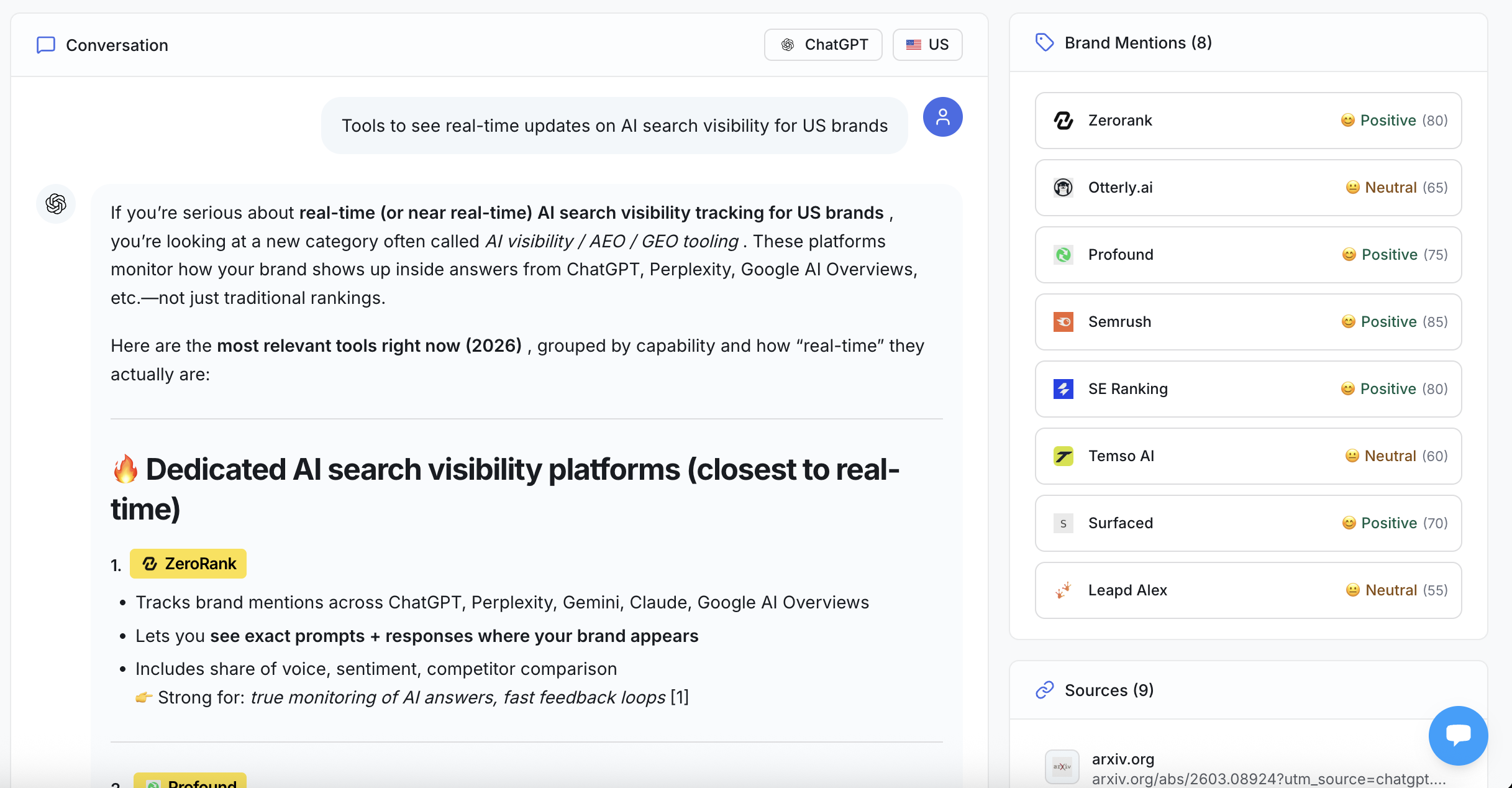
Read the recommendation in context. If the client is named as a source but another product is presented as the better fit, the report should explain what that competitor is being chosen for.
For example, the answer may favor a competitor for migration support. That gives you something concrete to investigate: does the client’s public migration page explain supported imports, setup effort and the help available?
Our AI search visibility metrics guide (opens in a new tab) explains the measures. The monthly report is where you connect them to a decision.
Start with the part the client will remember
A useful opening sounds like someone has read the answers.
Here is a sample summary for an email software client:
“Your product appears in more small-business comparisons, but the migration questions still favor competitors. Their guides explain what transfers and how long setup takes. We will update your migration page with those details and track the same questions next month.”
The client can see the result, the gap and the next investment in one paragraph.
Put the strongest finding first, even when it complicates a positive chart. “More citations, fewer recommendations” is a better conversation than “visibility is up” when that is what the answers show.
A real ZeroRank customer described a similar distinction in their AppSumo review (opens in a new tab):
“It is especially useful for seeing where branded visibility is already strong and where non-branded discovery is weak.”
— Lowcountry_Digital_Works, verified purchaser, 21 October 2026.
That is a useful reporting question: does AI recognize the client only when someone already knows its name, or does it introduce the client to a buyer looking for options?
Keep those two groups separate. A strong result for “Is Acme good for newsletters?” cannot fill the gap in “Which newsletter tools suit a small online store?”
Show the answer behind the number
Once the summary is clear, build the evidence around it.
Show the client how often the brand appears, how often it is recommended and how often the answer links to the client’s website. Put the counts beside the percentages so the scale is obvious.
If a brand appears in 42 of 200 answers, its mention rate is 21%. If the previous matched period was 30 of 200, the increase is six percentage points. Those sample numbers are enough to explain the calculation; the report itself should use the client’s counts.
Keep the same core questions, markets and platforms for the comparison. Add new research questions in a separate group. Otherwise, changing the prompt set can change the score before the client has shipped anything.
You can put the scope in a short note below the results: reporting dates, comparison dates, market, language, platforms and answers received. The full question list can live in the appendix.
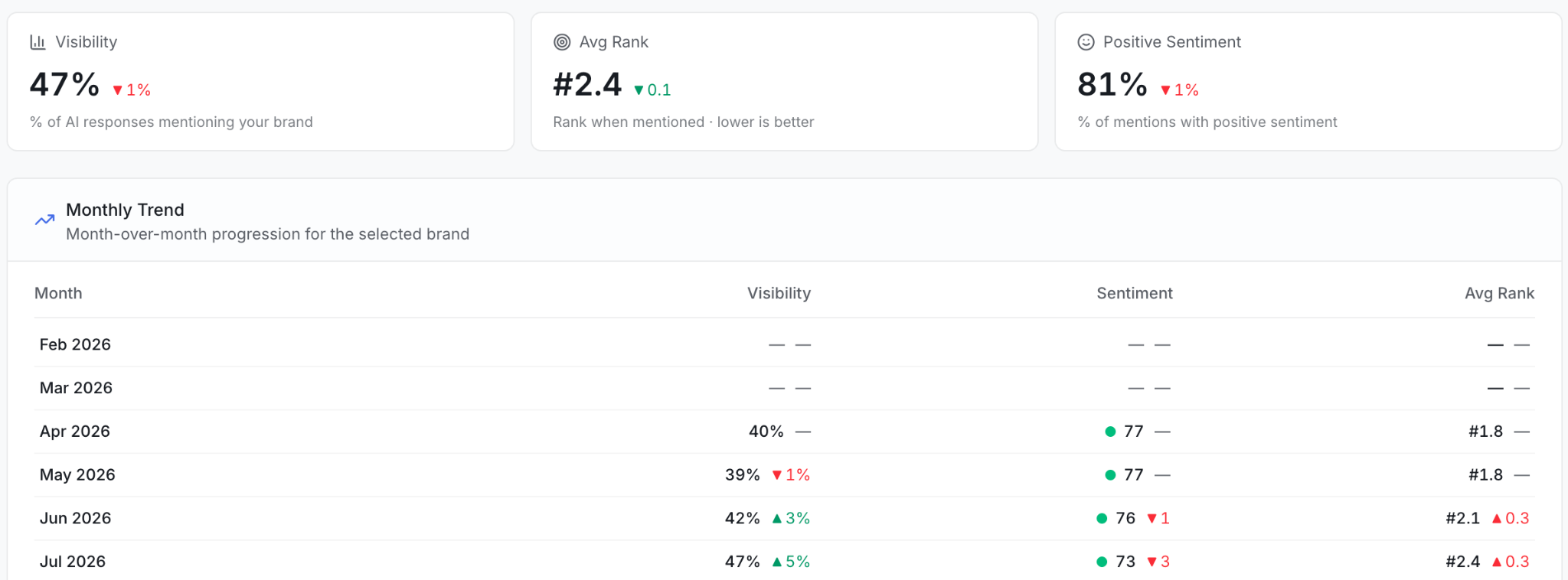
ZeroRank’s Reports view gives you the overview. Use the underlying answers to explain why a movement matters: a broader shortlist, an inaccurate feature description, a newly cited comparison or a buying question where the client is still absent.
One question can lead to several different reports
In a saved ZeroRank check from 25 October 2026, we asked four engines the same US-market question: “Compare AEO platforms for Perplexity and Gemini.”
ChatGPT returned an answer with three source URLs. Gemini returned an answer with two. Claude returned an answer without cited URLs and without triggering web search. The Google search completed without an AI Overview.
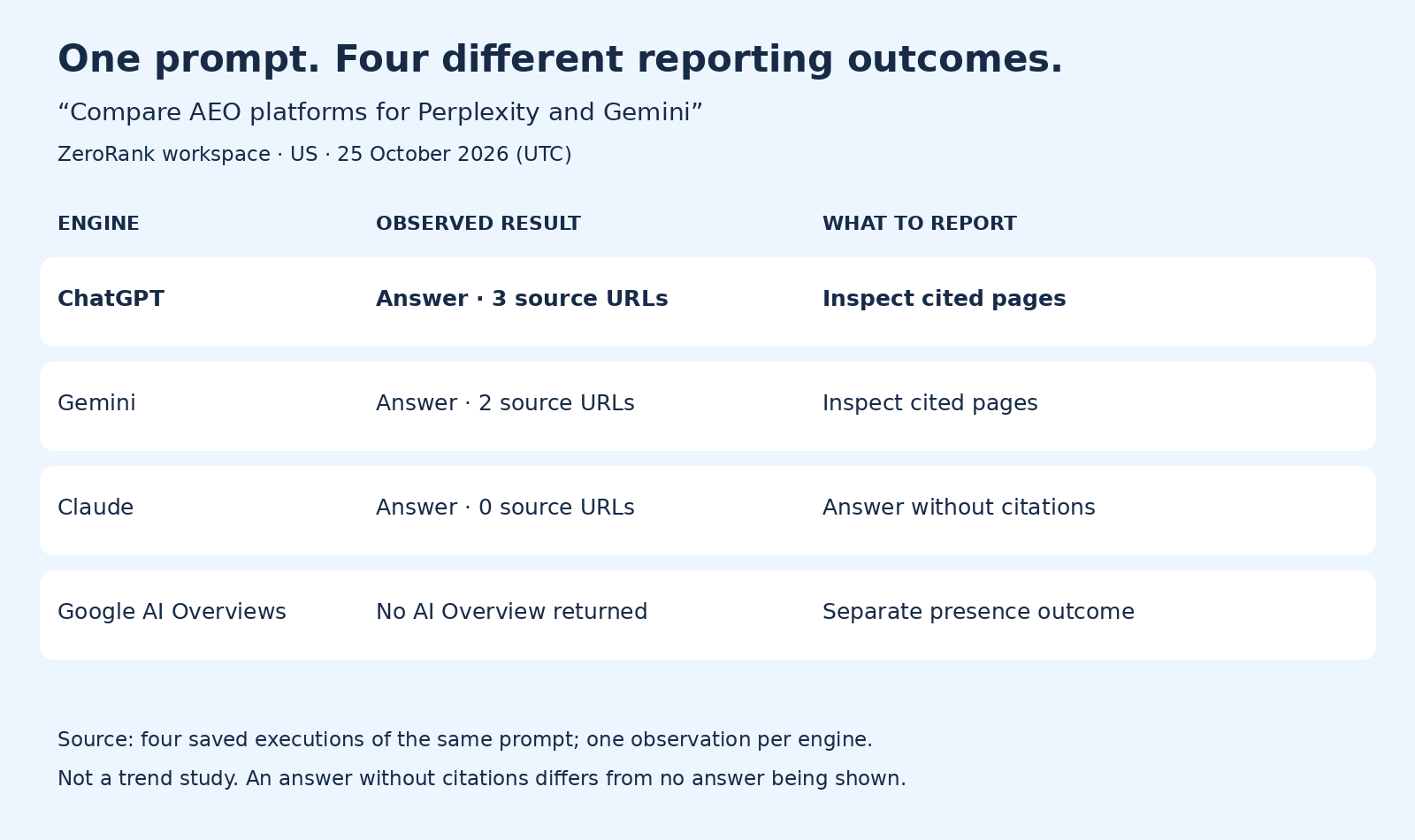
For this check, there were three AI answers to review and one search without an Overview. A report that displays all four as equivalent “brand absent” results would lose the explanation.
The sources also pointed to different next steps. ChatGPT cited HubSpot, AnswerLine and Searchable; Gemini cited Promptwatch and Reddgrow. An agency reviewing those answers would inspect those pages before recommending an outreach campaign or a new comparison article.
This is why the engine breakdown belongs beside the overall result. It tells you where to look next.
Turn competitor findings into work someone can ship
“Competitor X has more visibility” leaves the client waiting for the next sentence.
The useful finding is more specific: a competitor is repeatedly recommended for a particular audience, its integration guide answers a question your client’s page misses, or an outdated third-party comparison keeps feeding the wrong feature description into answers.
Open the cited page. Read it. Check what it says about the client and what information it gives the buyer.
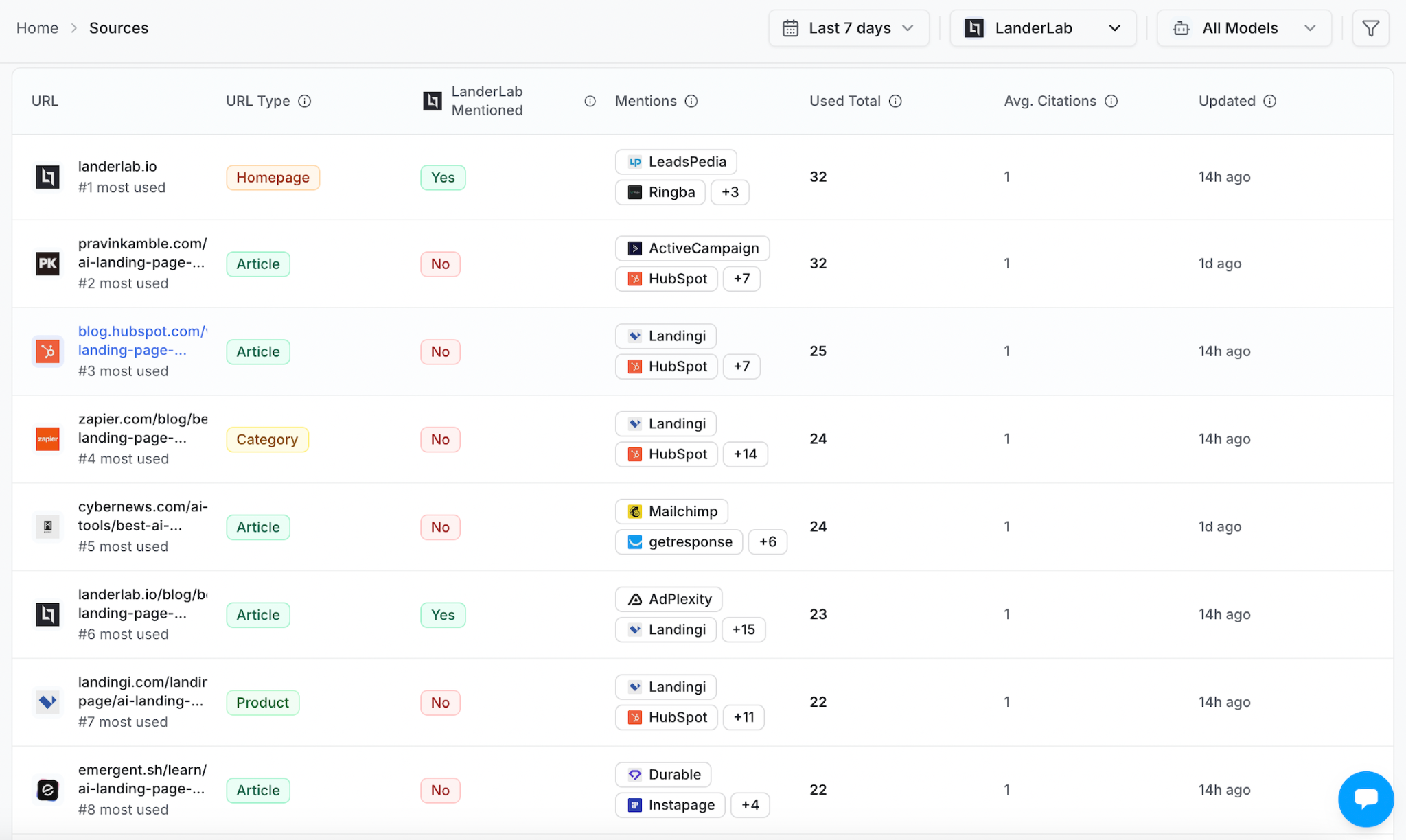
The Sources view helps you find those pages. The editorial decision comes from inspecting them.
If the missing information belongs on your client’s own site, improve that page. If a relevant publisher’s comparison has the wrong details, send a concise correction with supporting evidence. If the answer is already accurate and the product simply does not fit that use case, choose a more relevant buying question.
Our citation gap analysis guide (opens in a new tab) walks through that investigation.
Then show what shipped. Link the page, describe the change and record when it went live. “Added supported import formats to the migration guide” gives the client something they can open. “Worked on AI optimization” does not.
Keep outreach that is awaiting a reply under work in progress. When a correction goes live, move it into completed work and add the link.
Put visits and leads beside visibility
A citation can introduce the brand without sending a visit immediately. Your report still needs to show what happens when people do arrive.
Pew Research Center’s analysis (opens in a new tab) of browsing data from 900 US adults found that users clicked links inside Google AI summaries on just 1% of visits to results pages with a summary. The research covered 68,879 unique Google searches from browsing activity in March 2025.
That makes “we earned more citations” and “we gained more leads” two different parts of the client conversation.
Show recognized AI referral sessions and the signups, qualified leads or purchases recorded from those sessions. Add self-reported discovery from forms or sales calls. Someone who says “I found you on ChatGPT” can help explain a journey that analytics recorded later as a direct visit.
Keep these signals on separate lines so the same buyer is not counted twice. If the client wants more detail, our guide to measuring SEO ROI in a zero-click world (opens in a new tab) covers how they fit together.
In ZeroRank, connecting Google Analytics adds AI Traffic to reporting. You can include it in shared dashboards and PDF exports, alongside the visibility evidence. Allow for Analytics processing delays when choosing the report’s end date.
Open the monthly reporting template
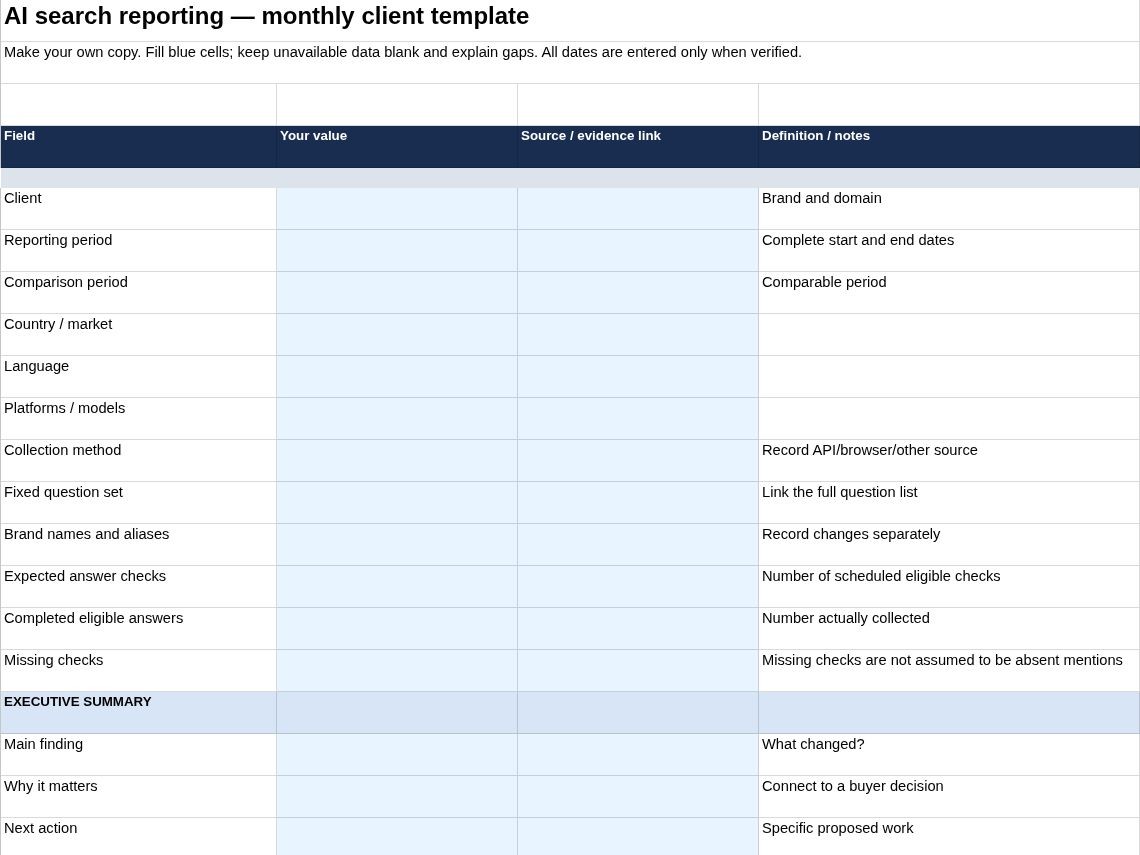
Open the editable AI search reporting template (opens in a new tab).
Choose File → Make a copy, then fill the blue input cells with the client’s details and results. The sheet calculates mention, recommendation and own-site citation rates from your counts, and includes spaces for the executive summary, completed work, business evidence and saved answers.
For a quick calculation check, enter 200 eligible answers and 42 answers mentioning the brand: the mention-rate cell should show 21%. Replace those sample inputs before using the sheet for a client.
Link the saved answer or source beside each finding. That keeps the client-facing summary short while letting anyone inspect the detail.
Build the report around the next conversation
ZeroRank can generate a PDF report with visibility trends, sentiment and prompt performance. Shared dashboards can also include on-page, off-page and technical opportunities, with AI Traffic when Analytics is connected.
Choose the sections that explain this client’s situation. A client struggling with inaccurate product details needs to see the answers and corrections. One investing in category discovery needs to see non-branded questions and the competitor shortlist.
For scheduled emails, check the reporting window: the email summarizes the last 30 days even if it is sent weekly. Use matching seven-day periods when the discussion is specifically about weekly change.
The finished report should make the next conversation easier: here is how buyers are being introduced to your company, here is the information shaping that introduction, and here is what we will improve.
Start tracking your AI search visibility with ZeroRank and build the report around the questions your clients need to win.
Filed under AI Search StrategiesAI search
Keep reading
All posts AI Search Strategies
AI Citation Gap Analysis: Stop Losing Ground to Competitors
Find where AI answers cite competitors, investigate the sources behind them, and turn citation gaps into content updates, outreach and repeatable tracking.

 AI Search Strategies
Answer Engine Optimization (AEO) Checklist
Use this AI search optimization checklist to improve your content, build brand credibility, and fix technical issues so you can get found in AI answers.
 AI Search Strategies
How to Optimize Content for AI Search: 10 Practical Steps
This guide explains how to find content gaps, create or optimize the right pages, earn more citations, and measure the results with ZeroRank.