AI Prompt Volume: Which Questions Are Worth Tracking?
Learn what AI prompt volume means, build a prompt set around real buyer decisions, and turn the answers into specific content improvements.

Key Takeaways
- ZeroRank’s AI Volume is a monthly estimate for a prompt’s exact phrasing; changing its text or location refreshes the estimate.
- Choose prompts for buyer relevance, then use volume to prioritize. Missing volume is not zero demand.
- Build a set covering discovery, constraints, comparisons and evaluation, with branded questions reported separately.
- Review recommendations and cited pages, fix a specific information gap, then recheck a stable prompt set.
You have 200 questions you could track in AI search. Some have large volume estimates. Others show a dash. Which ones deserve a place in your prompt set?
Choose badly and you can spend weeks improving visibility for questions your buyers would never ask. Choose well and the answers show you which competitors get recommended, what information buyers see and which pages need work.
Prompt volume helps you prioritize. The useful work starts when you connect that demand to a specific buyer decision.
What is AI prompt volume?
AI prompt volume estimates how often a prompt is asked in AI tools. In ZeroRank, AI Volume is a monthly estimate for the prompt’s exact phrasing, displayed in a format such as ~1.2K/mo.
Changing a tracked prompt’s text or location refreshes its estimate. Suggested prompts also carry a volume badge and are ordered by volume within each topic.
Keep four measurements separate:
- AI prompt volume: estimated demand for a prompt.
- Google volume: estimated searches on Google, displayed separately where available.
- Tracking runs: checks your monitoring tool performs. Thirty checks of a question are not thirty customer searches.
- Brand visibility: how often your brand appears in the answers collected for your tracked set.
A volume estimate is not a count of unique people, and it does not tell you whether your brand gets recommended. Our AI search analytics guide (opens in a new tab) explains how those measurements fit together.
Read the research screen before adding prompts
In ZeroRank Prompt Research (opens in a new tab), enter a topic, question or competitor domain and choose your market.
Sources include People Also Ask, related searches, keyword data, a domain’s ranking keywords and queries observed on AI platforms.
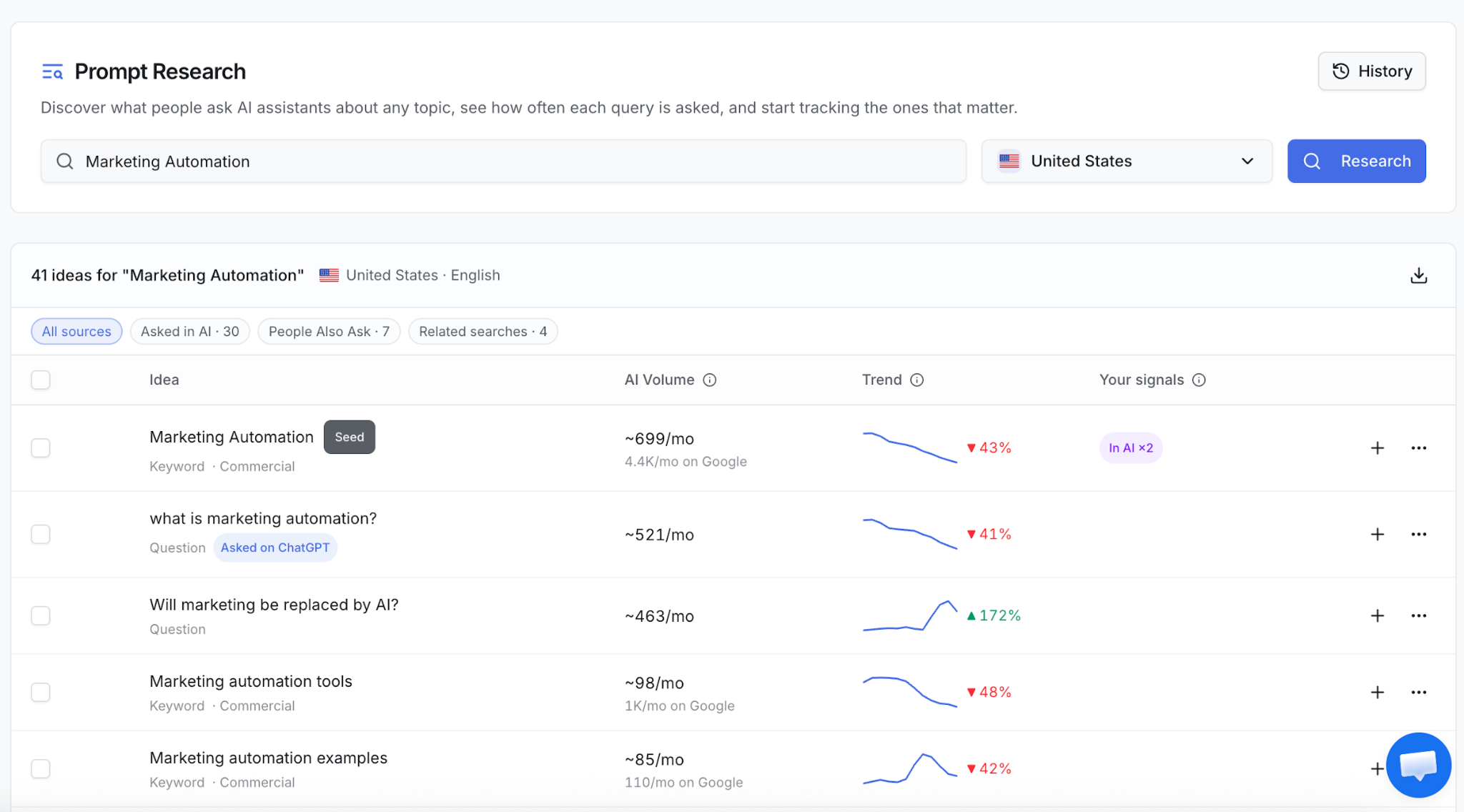
ZeroRank Prompt Research: a saved US-market search for “Marketing Automation.”
Read the screenshot like so:
- Market: United States, English. Research the market you sell into before comparing opportunities.
- Source: “Asked on ChatGPT” identifies an observed AI question. People Also Ask and related searches provide other routes to relevant ideas.
- Intent: the seed “Marketing Automation” is labeled commercial. Inspect the wording and answer too; the label is a starting point.
- AI versus Google volume: the seed shows ~699/mo in AI and 4.4K/mo on Google. These are separate measurements.
- Trend: use the sparkline to spot changes worth investigating. A rising trend does not make an irrelevant question a good fit.
When reliable volume data is unavailable, ZeroRank shows a dash. That is missing data, not proof of zero demand. Research ideas added to tracking retain the volume estimate shown in the research result; estimates can change when wording or location changes.
A smaller volume can be the better opportunity
Suppose you sell email automation software to small Shopify stores. The same screenshot offers three very different candidates:
- “What is marketing automation?” — ~521/mo. Useful for education, but broad. Keep it if teaching new buyers is part of the goal.
- “Will marketing be replaced by AI?” — ~463/mo. A popular question, but weakly connected to choosing your product. Skip it for this buying-decision set.
- “Marketing automation tools” — ~98/mo. Smaller displayed demand, but closer to a software shortlist. Preview the answer and check whether it includes products for your audience.
Now add a question from a real migration call: “Which email tool lets a small Shopify store migrate existing automations?” The screenshot supplies no volume for that question. Research it separately. If it reflects a recurring objection and your product solves it, it may deserve tracking even without an estimate.
These are planning decisions for the example business. The three numbers come from the saved screenshot; the migration question is an illustrative candidate with no assigned volume.
The rule is simple: choose for buyer fit first. Use volume to prioritize among relevant questions.
Build a prompt set around one buying decision
Start by writing one sentence: “We want to understand which email automation tools AI recommends to small Shopify stores, and what determines the shortlist.”
That gives the prompt set a purpose. A collection of loosely related questions about marketing does not.
1. Cover different parts of the decision
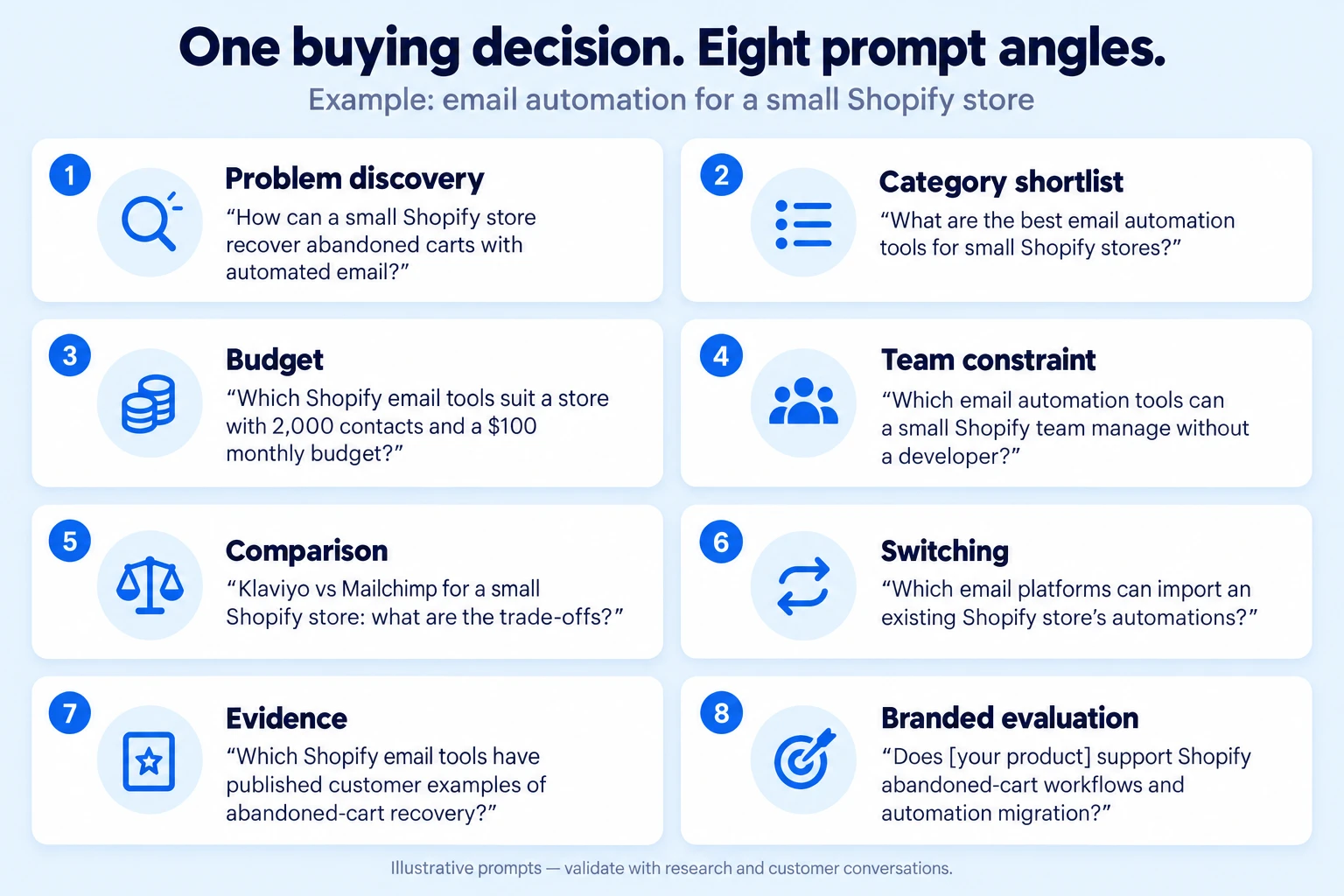
Here is an eight-question starter set for that business. These are illustrative prompts to validate against research and customer conversations, not claims that each wording has observed demand.
- Problem discovery: “How can a small Shopify store recover abandoned carts with automated email?”
- Category shortlist: “What are the best email automation tools for small Shopify stores?”
- Budget: “Which Shopify email tools suit a store with 2,000 contacts and a $100 monthly budget?”
- Team constraint: “Which email automation tools can a small Shopify team manage without a developer?”
- Comparison: “Klaviyo vs Mailchimp for a small Shopify store: what are the trade-offs?”
- Switching: “Which email platforms can import an existing Shopify store’s automations?”
- Evidence: “Which Shopify email tools have published customer examples of abandoned-cart recovery?”
- Branded evaluation: “Does [your product] support Shopify abandoned-cart workflows and automation migration?”
Replace the example budget, competitors and capabilities with your actual market. Keep the branded question in a separate reporting group: it tests whether AI understands a named product, while the other questions test discovery and selection.
2. Remove repetition and leading questions
“Best Shopify email software,” “top Shopify email software” and “best email software for Shopify” may test nearly the same decision. Start with the wording best supported by research. Add variations when they test a meaningful difference, such as budget, location or an integration.
Avoid “Why is our product the best?” That instruction pushes the answer toward praise. Ask for options or trade-offs so you can learn whether your product earns a place.
Also remove impossible scenarios. If your product does not support Shopify, this is the wrong set regardless of its volume.
3. Write down why each prompt belongs
For every candidate, record the exact wording, buyer need, research or customer source, market, AI volume, decision stage and the page you could improve. Keep Google volume in a separate field.
Then choose one of three outcomes:
- Track now: relevant buyer decision, supported by research or customer evidence, with a clear reason to monitor the answer.
- Investigate: plausible question, but unclear demand, audience fit or answer quality. Preview it and check customer evidence.
- Skip: outside your market, redundant, leading or unrelated to a decision your product can help with.
A useful note is specific: “Track now: prospects ask about migration in demos, we support it, and our migration guide does not explain which workflows transfer.” “Biggest number in the export” is not enough.
Check the answers before committing your tracking budget
Preview a shortlist of candidates. Does each question produce a useful explanation or comparison? Does it describe your actual buyer? Does the answer reveal a gap you could address?
Then organize the approved set into topics or tags so discovery, comparisons and branded evaluation can be reviewed separately.
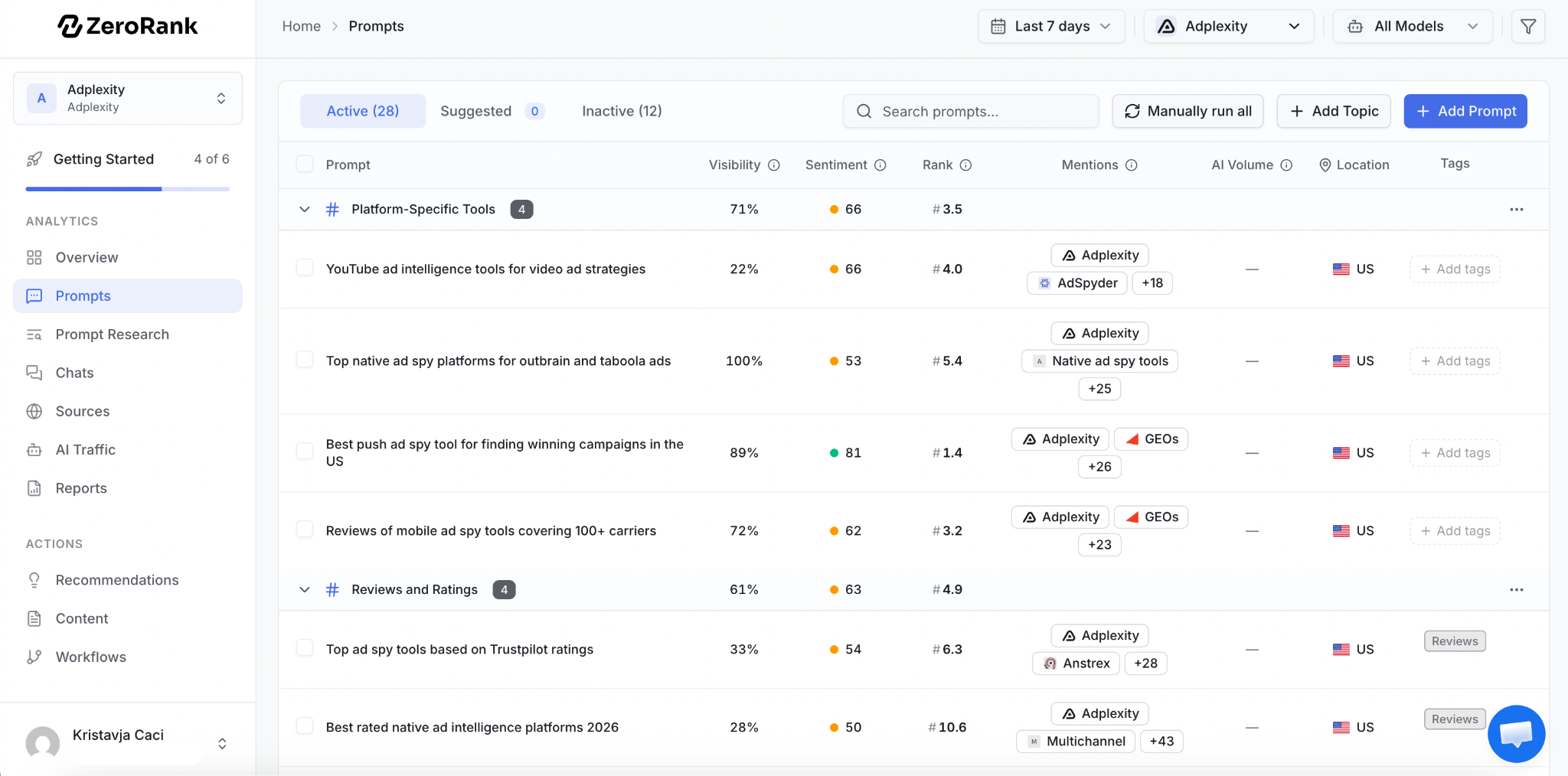
The Prompts table separates AI Volume from Visibility, Rank and Mentions. This saved example also shows topic groups and location; a dash in AI Volume can sit alongside measured visibility.
Notice the first visible prompt in the screenshot: it has 22% visibility and no volume estimate. Those fields answer different questions. A missing demand estimate does not prevent you from measuring what appears in the collected answers.
Keep a stable core of prompts for comparison over time. Put new experiments in a separate group and record when you add or change questions. Otherwise a better headline visibility score could simply reflect an easier prompt set.
Choose models and tracking cadence around your market and available answer-run budget. A larger list means more answers to pay for and review. Expand when a new question adds useful coverage, rather than to reach an arbitrary prompt count.
Turn the prompt set into content decisions
Read the answer, not just the mention count
For each priority prompt, record four things: is your brand mentioned, is it recommended for this buyer, is its description accurate, and which pages are cited?
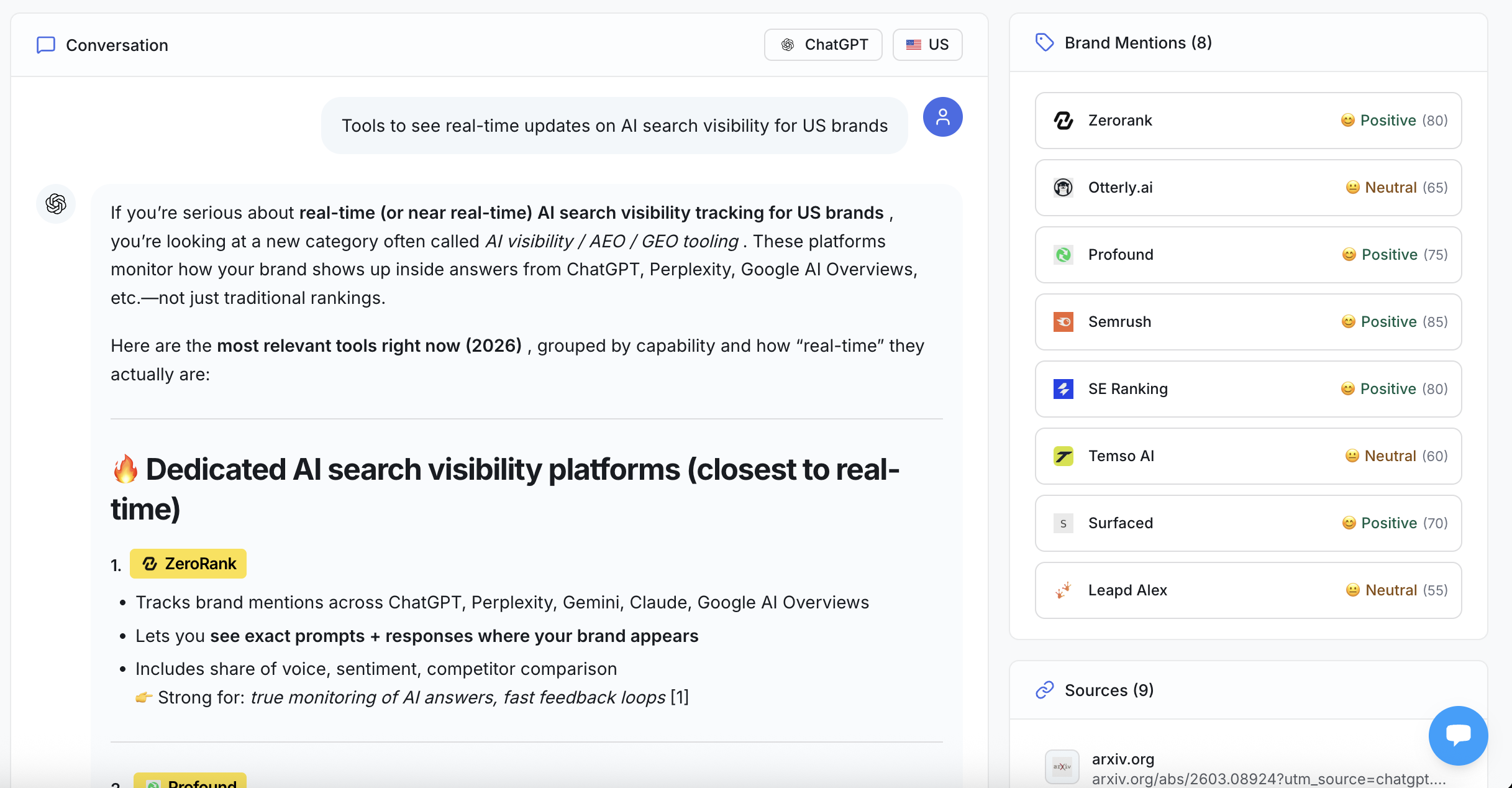
An individual saved ChatGPT answer in ZeroRank shows the prompt, answer text, brand mentions and sources together. Use it to inspect the recommendation in context; one answer is one observation.
A brand can appear in a list yet be described as unsuitable for the buyer’s budget. Your site can also be cited for an explanation while another product gets the recommendation. Neither situation is resolved by counting mentions alone.
For the Shopify migration example, look for the reason behind the shortlist: support for workflow imports, setup effort, pricing or integration details. If the answer gives an incorrect limitation, check the cited page and your own documentation before deciding what to change.
Inspect the pages the answer relies on
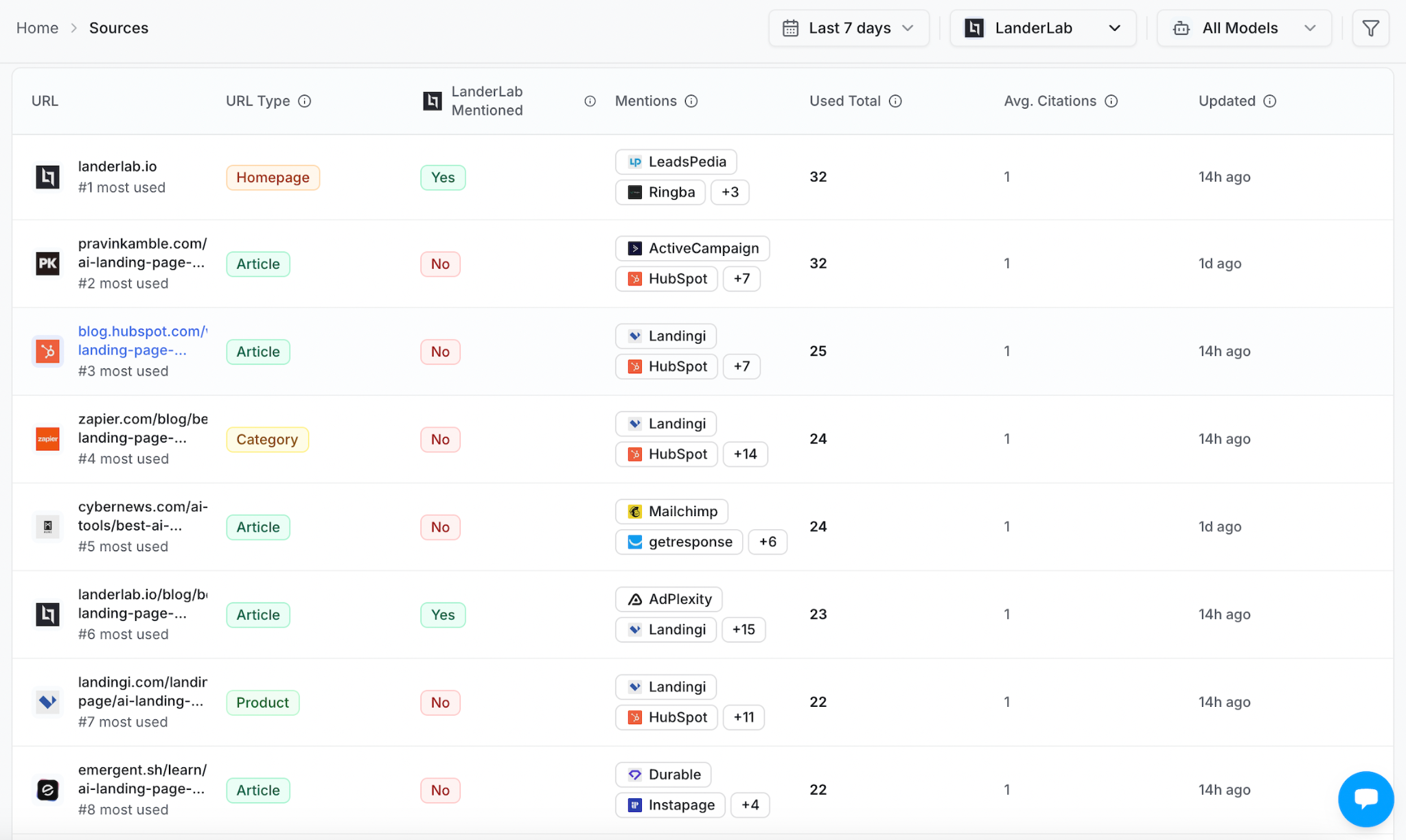
The Sources view lists cited URLs alongside whether the tracked brand is mentioned. In this saved example, the brand’s own homepage and several third-party pages appear in the same list.
The “No” rows in the screenshot identify pages to inspect. They are not automatic outreach targets: first open the page, check the relevant passage and establish which answers cite it.
Use the evidence to choose the next action:
- Your own page omits a decision-critical detail: add a clear explanation, supported by a product screenshot, documentation or customer example.
- The answer misstates a capability: verify the current product behavior, then correct the relevant documentation or comparison passage.
- A third-party comparison is cited but omits your relevant product: consider a concise, evidence-backed inclusion request that fits its audience.
- You are cited but another product is recommended: inspect the stated trade-off. More mentions will not fix a genuine mismatch in price or functionality.
Our AI citation gap analysis guide (opens in a new tab) explains how to investigate those source gaps.
Keep a record you can recheck
For example: “The migration prompt recommends competitors. Our guide explains contact imports but does not say whether automation workflows transfer. Product support confirms the limits. Update that section, add a walkthrough, then recheck the same prompt and models.”
Record the original answer, cited URL, page change and date. Compare later answers with the same wording, market and model settings across multiple runs. Treat an isolated improvement as something to investigate, rather than proof the edit caused it.
Keep referrals, signups and qualified leads alongside visibility. Do not multiply prompt volume by visibility and present the result as expected traffic.
FAQs
Should I track only high-volume prompts?
No. Cover the buyer decisions that matter to your product, then use demand estimates to order relevant opportunities. A specific purchase objection can justify tracking even when its estimate is missing.
Does a blank AI Volume mean nobody asks the question?
No. A dash means a reliable estimate is unavailable. Use customer evidence and the usefulness of the resulting answer to decide whether to investigate or track it.
Should every prompt mention our brand?
No. Unbranded questions test discovery and recommendations. Branded questions test evaluation and product understanding. Keep them separate so strong branded performance does not hide weak discovery.
Is query fan-out the same as prompt volume?
No. Google explains (opens in a new tab) that AI Overviews and AI Mode may issue related searches while developing an answer. Those searches are not automatically separate questions asked by users.
Choose a set you can act on
Start with one buyer decision and a small set covering discovery, selection, comparison and evaluation. Research the wording, check demand, preview the answers and remove questions that do not earn their place.
Then choose one gap the answers reveal and fix the page or source behind it. That gives the next round of tracking something useful to measure.
Research your first prompt set with ZeroRank (opens in a new tab) and turn the answers into a clear next step.
Filed under AI Search EducationAI search
CMO. On a mission to make ZeroRank the go-to platform for AI search visibility.
Keep reading
All posts AI Search Education
 24 AI Search Statistics for 2026: Clicks, Citations and Buying Behavior
From search-result behavior to retail conversions, these 24 AI search statistics connect 2025–2026 research with practical marketing decisions. See what to track, how to evaluate citations, and where ZeroRank fits into the workflow.
 AI Search Education
 AI Search Analytics: What to Track and How to Use the Data
Learn how to use AI search analytics to track visibility, research prompts, analyze sources, and turn your findings into practical improvements.

 AI Search Education
 The 14 Best GEO Agencies for SaaS in 2026 (Pricing and G2 Ratings Verified)
We verified pricing pages, G2 and Clutch ratings, and AI search deliverables for 14 GEO agencies serving SaaS. Six publish no price. See who fits your budget.